Connecting Podman containers over ZeroTier's 6PLANE
Introduction
ZeroTier provides a guide for using 6PLANE with docker, but not for Podman. Futhermore the docker guide assumes that you'll want all your containers accessible on the ZeroTier network.
I wanted to use Podman, and to be able to specify which containers are accessible. The following are the steps I took to get this working. It should be noted that this was for Podman running as root, not rootless.
Step 1: Enable 6PLANE in ZeroTier
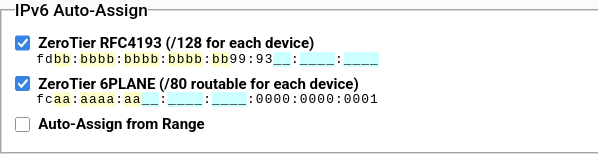
Start by checking the ZeroTier 6PLANE option in ZeroTier. Note that the network ID will start with fc.
If you happen to be using the drop not chr ipauth flow rule in ZeroTier you'll need to adjust it to allow these due to a closed but apparently not fixed bug. For my setup I just added the condition that inter-6PLANE isn't dropped:
drop
  not chr ipauth
  and not ipsrc fcaa:aaaa:aa00::/40
  and not ipdest fcaa:aaaa:aa00::/40;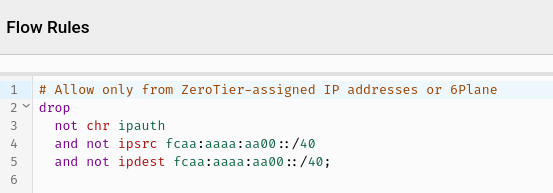
Step 2: Get IP address for host
On the host you want to run Podman, you can use the ip addr command to get the IP address. You want to find the fc network of the ZeroTier interface. You can probably use:
❯ ip addr | grep "inet6 fc"
    inet6 fcaa:aaaa:aacc:cccc:cccc::1/40 scope global
In this case aa part will be the same between hosts, while the cc part is unique to each host.
Step 3: Create the Podman network
If you try to create this network directly in Podman it will fail:
❯ sudo podman network create --ipv6 \
    --subnet fcaa:aaaa:aacc:cccc:cccc::/80 \
    --gateway fcaa:aaaa:aacc:cccc:cccc::1 \
    zt6

Error: subnet fcaa:aaaa:aacc:cccc:cccc::/80 is already used on the host or by another config
So instead we have to add the network with a slightly different subnet and then edit it manually.
❯ sudo podman network create --ipv6 \
    --subnet fcad:aaaa:aacc:cccc:cccc::/80 \
    --gateway fcad:aaaa:aacc:cccc:cccc::1 \
    zt6
Then open /etc/containers/network/zt6.json and change the subnet to fcaa:aaaa:aacc:cccc:cccc::/80 and the gateway to fcaa:aaaa:aacc:cccc:cccc::1. You can also remove the IPv4 subnet if desired.
Step 4: Create a container and test
Now that everything is set up we can test with a simple 'whoami' container. Make note that you'll need to add the --network zt6 flag if you want it to only be accessible on the ZeroTier network, or --network zt6,podman if you want it to be accessible on both networks.
sudo podman run \
  --name whoami \
  --rm \
  --network zt6 \
  docker.io/traefik/whoami
Get the IP address of the container using podman inspect:
❯ sudo podman inspect whoami | jq '.[].NetworkSettings.Networks.zt6.GlobalIPv6Address'

"fcaa:aaaa:aacc:cccc:cccc::2"
Then test that you can connect to this container from each of the host, another host, and potentially containers on another host (after doing the 6PLANE setup there).
❯ curl [fcaa:aaaa:aacc:cccc:cccc::2]
Hostname: ab0c9fb6d184
IP: 127.0.0.1
IP: ::1
IP: fcaa:aaaa:aacc:cccc:cccc::2
IP: fe80::74e2:47ff:fe08:e67a
RemoteAddr: [fcaa:aaaa:aacc:cccc:cccc::1]:40594
GET / HTTP/1.1
Host: [fcaa:aaaa:aacc:cccc:cccc::2]
User-Agent: curl/8.17.0
Accept: */*
Conclusion and next steps
Now any container to which the zt6 network is added will be accessible to any other hosts and containers on the same ZeroTier network.
Flow rules should be added to your desired level of granularity to control access between hosts. Keep in mind that the hosts is in control of the IP addresses assigned to containers, so the access provided to the containers should always be less than the access provided to the host.
Also keep in mind that while a host can't just change it's identifier, it's entirely possible that one Podman container could change it's IP address.